

What is the Idea behind Libby Kids?
- A Kid Friendly Reading Environment: A library of books full of age appropriate titles and a reading buddy who will guide your child through their reading experience.
- Parental Controls: Parents can feel at ease knowing they have control over what content their kids are able to access.
- Gamification: With badges to earn and unlock, reading is made fun with a mix of challenges and goals that readers can use as motivation.
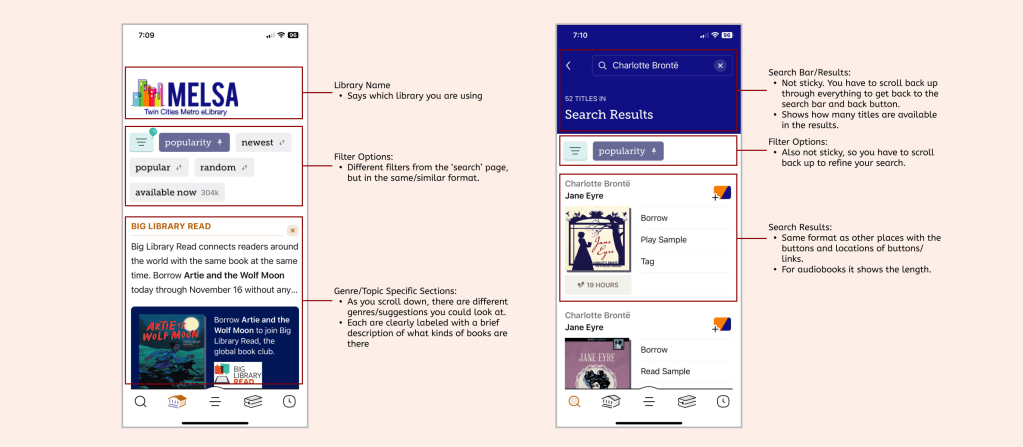
Heuristic Analysis of Libby App
User Interview Plan
In order to help decide what features we wanted to put in our app, we did some initial user interviews.
6 Interviews
As this is an app targeting both parents and their young children, we interviewed three adults and three children to gain insight from both demographics regarding their reading habits.
3 Questions
– What parental controls would parents want in an app like this?
– What are parents looking for in a kids reading app?
– What would be enticing for kids in a reading app to get them to spend more time reading?
1 Goal
Through research, we aimed to find out what parents would like their kids to be reading and what parental controls they would put in place. We also want to understand what age groupings are needed, and what families are reading together.
EMPATHIZE
Competitor Analysis
Epic!
Epic! is a large digital library designed for kids of all reading levels with the goal of inspiring a lifetime of reading.
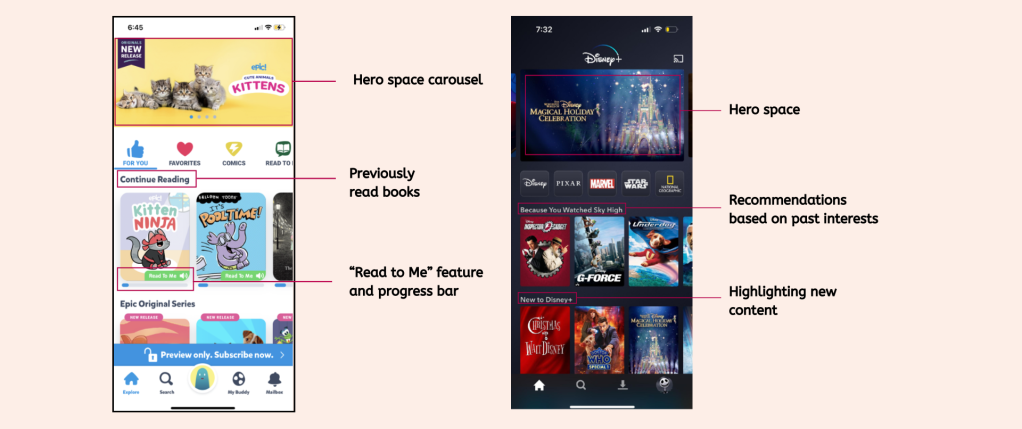
Disney +
Disney+ is the ultimate streaming destination for entertainment from Disney, Pixar, Marvel, Star Wars, and National Geographic.
Survey Responses
In order to gather more quantitative data to support our research findings, we conducted a survey with over 60 responses and got some very insightful information.
- Overall, there was a sentiment that most parents wanted to have a quantifiable reading goal and wanted their kids to learn to love reading, as you can see by this quote here – “I hope reading would remain a warm, cozy, unintimidating, positive thing until adulthood”
- Here are a few stats that led us to create a familiar UI platform for kids to use and also make it easier to incorporate screen time limits which were important for parents
77%
of respondents’ children interact with Disney + and 62% interact with Netflix the most.
How might we create a platform that functions similarly so that kids have an easier time picking up the app on their own?
88%
of parents limit screen time for their children.
How might we make it easier for parents to incorporate screen time limits into reading?
61%
of respondents have heard of Libby.
The main KPI measured for Libby Kids will be to increase user awareness to 75% of the market share.
User Personas based on User Research
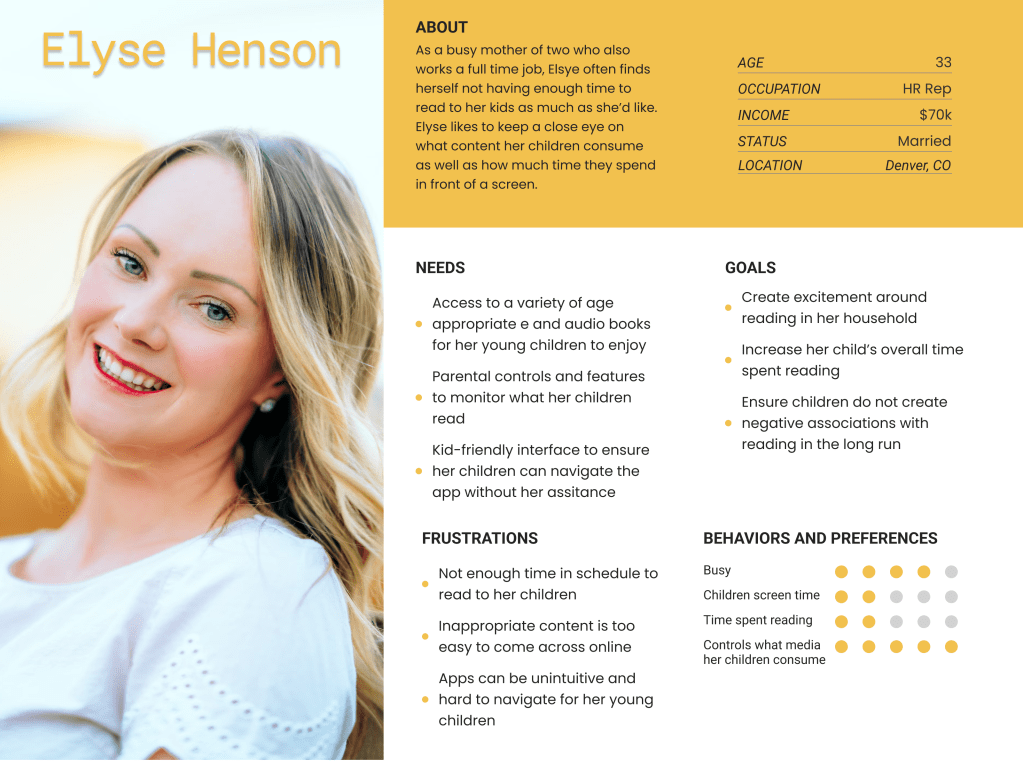
After interviewing 3 parents we created the user persona Elyse is a busy working mom who doesn’t always have the time to read with her kids. She is looking for a way to allow her children read what they want too, but with parental control still in place.
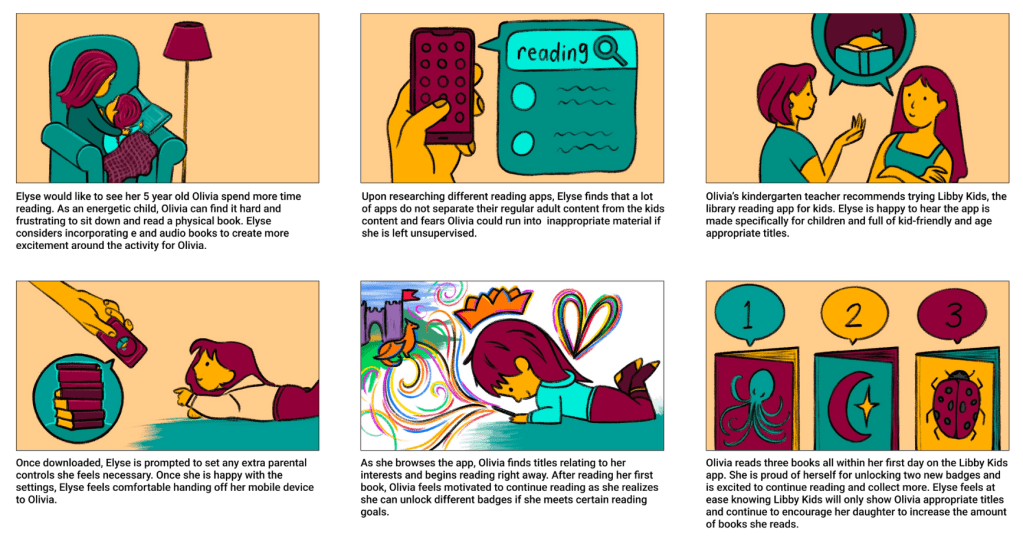
After interviewing 3 children we created the user persona Olivia. She is a 5 year old who is just starting kindergarten and likes to read when a book is given to her, but she’s not so motivated to choose one herself.

DEFINE
User Insight
After conducting 6 interviews and one survey with 61 responses, we discovered that most parents want their kids to learn to love reading as well as incorporate screen-time monitoring and parental controls in a balanced way.
Problem Statement
Therefore, we believe that incentivizing kids to read more often & more enjoyably, while also providing an easier way for parents to be involved in their children’s reading experience would ultimately lead to a happier reading journey for the parent and child. We might do this by implementing gamification, and more thorough filtering options, recommendation system, and parental control features. Doing this will also help instill routine and lifelong joy for reading across users of all ages, ultimately broadening Libby’s market share and user base.
Value Proposition
Overdrive is developing a kids version of the library reading app Libby called Libby Kids to help both parents and children make reading more fun, appropriate, and independent.We’re better because Libby makes reading fun with games and checkpoint goal setting, and the ability to make customizable kids profiles.
We’re believable because 62% of parents check out books at the library for their kids at least once a month and it is important for them to instill a lifelong love of reading.
Feature Prioritization
Main Items & Goals
– Gamification elements
– Parental control options (screen time and age restrictions)
– Reading recommendations based on hobbies/interests

Storyboard
IDEATE
Parent Task Flow and Child Task Flow
The Happy Path

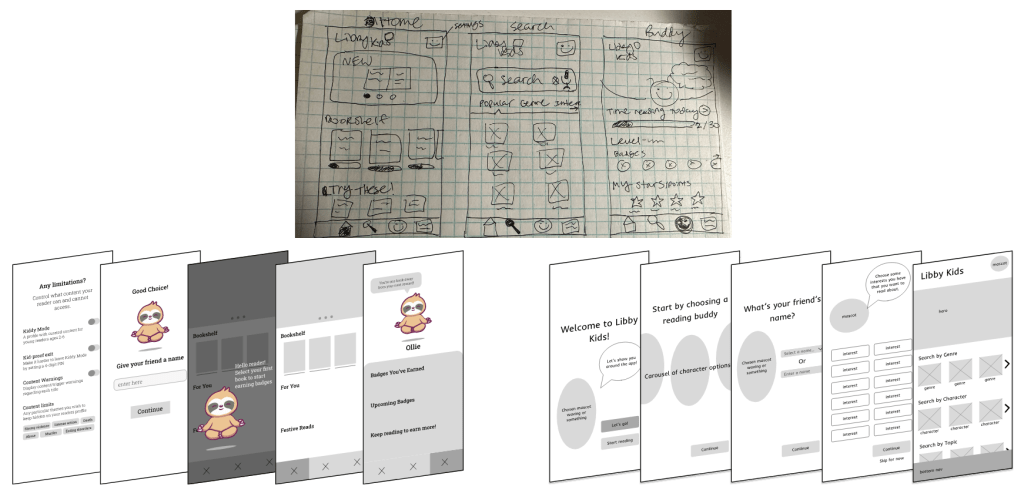
Sketching and Wireframes
UI Styleguide
UI Style Direction: This was a app design for a kids version of the existing Libby library reading app. The UI is similar to Libby with the addition of a kid-friendly, new color and other kid-friendly elements. Our UI Style adjectives we wanted this app to evoke include:
Colorful
Cozy
Educational
Playful
Colors
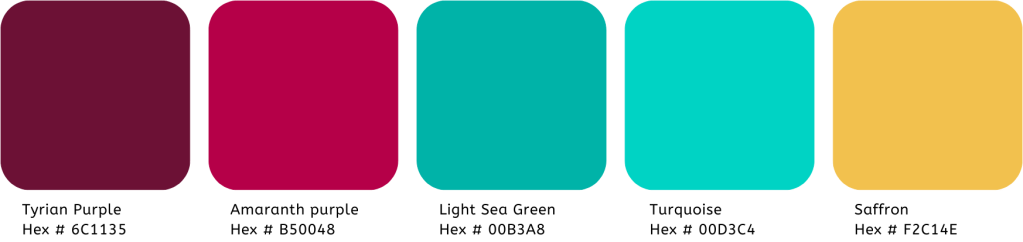
The Color palette we chose is intentionally similar to the current Libby App color palette, with the addition of a sunshiny yellow color. This color has also been added to the main logo to make the alternate logo for the Libby Kids App. We also use Black and White for the app. Finally, all colors were checked for accessibility, and will only be used in the combinations that are accessible, which is mostly only with either black or white.
Moodboard

Components

Typography

These specific typefaces were picked to be more accessible for children learning to read than the current typography of the Libby app and site. The typeface ABeeZee is specifically made to be easier for young readers. Another thing to note is that the App has five different typefaces available for use currently in the e book reader portion of the app controls.
Logo Variation for Libby Kids
The original Libby App uses this logo mark with a lighter maroon color for the head peaking over the book. We switched out the color for the head with the saffron yellow color that was added to the color palette for Libby Kids.

The Secondary logo mark is used in only a few places. The color for the face is again, all we changed, adding the saffron yellow color.
On the left, you can see the full Libby Kids app logo. We used the same typeface for the words “Libby Kids” as the Libby app used for the word “Libby,” and the secondary san-serif typeface is ABeeZee as explained above.
PROTOTYPE & TEST
Usability Testing Plan
1 Goal
The main goal of our first round of testing was to gauge how intuitive the design felt to users and understand any confusion or pain points that both the adults and children ran into when navigating the prototype. The second round was to validate our iterations.
2 Rounds of Testing
As this is an app targeted towards both parents and young readers, usability testing for Libby Kids was split into two. A total of 4 adults and 3 children were tested across two rounds to better gauge the success of the prototype.
3 Main Tasks
While the adults’ only task was completing onboarding, we asked the children to navigate through our prototype’s “Happy Path.” This consisted of getting started with the app as well as visiting their reading buddy to begin reading.
Testing Insights & Iterations
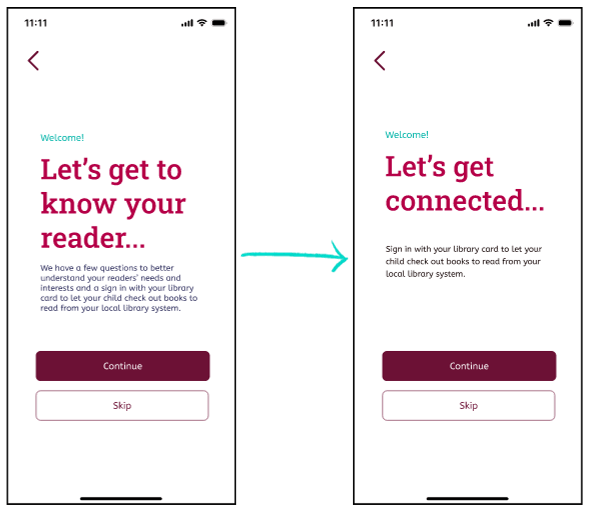
Shortened onboarding copy
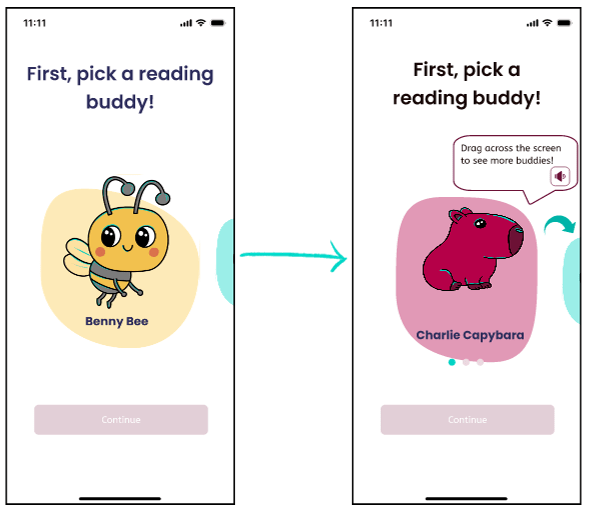
Added swipe indicator on carousel
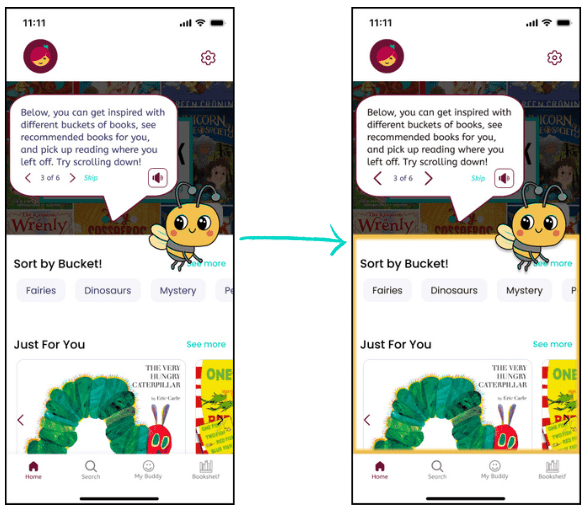
Highlighted relevant content during coaching

Libby Kids: Prototype
Link to the Prototype is HERE.
We designed the happy path for this prototype, but there are more paths that could be taken.
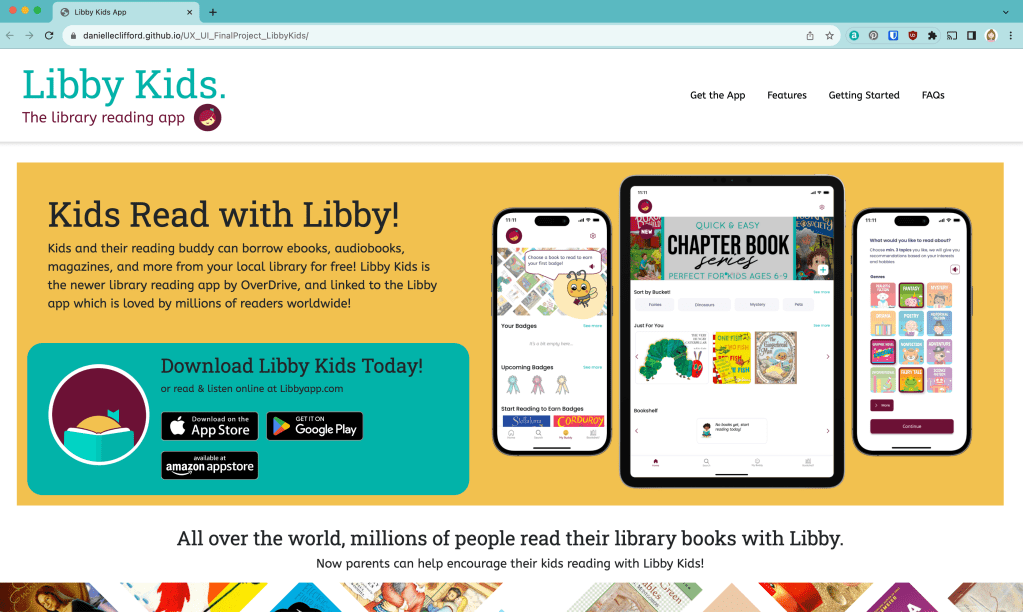
Libby Kids:
Advertisement Website
Conclusion and Future Ideas
Final Thoughts:
If our timeframe had allowed, we would have liked to test a broader range of ages to get more insight into how brain development impacts a child’s in-app interactions and experience.
In the future, to create a more interactive reading environment, we’d like to:
– Improve gamification features to include mini-games and other interactive elements.
– Include a way for parents to link to their Libby account. Include a way for parents to link to their Libby account.
– Provide even more personalized reading recommendations (Lexile score & AI recommendations).
– Create a Libby Kids community for friends to share and read together!
– Market to a variety of platforms and settings where kids/their parents spend time (school, library children section, kids apps, kids TV networks, kids podcasts, Youtube Kids)
Contributors and Resources
UX/UI Designers:
Eliana Smelansky, Carolina Juarez, Emma Duda, Brian Thyfault, Danielle Clifford
Tools Used:
Figma, Canva, Google Drive, Slack, Figjam, Pinterest, VS Code, GitHub, Procreate
Contact Me
Danielle Clifford
danielleeclifford@gmail.com
612-599-2319

 Danielle Clifford